How App Store ranking works (it's not just keywords)

By Alistair CooperPublished October 27, 2026
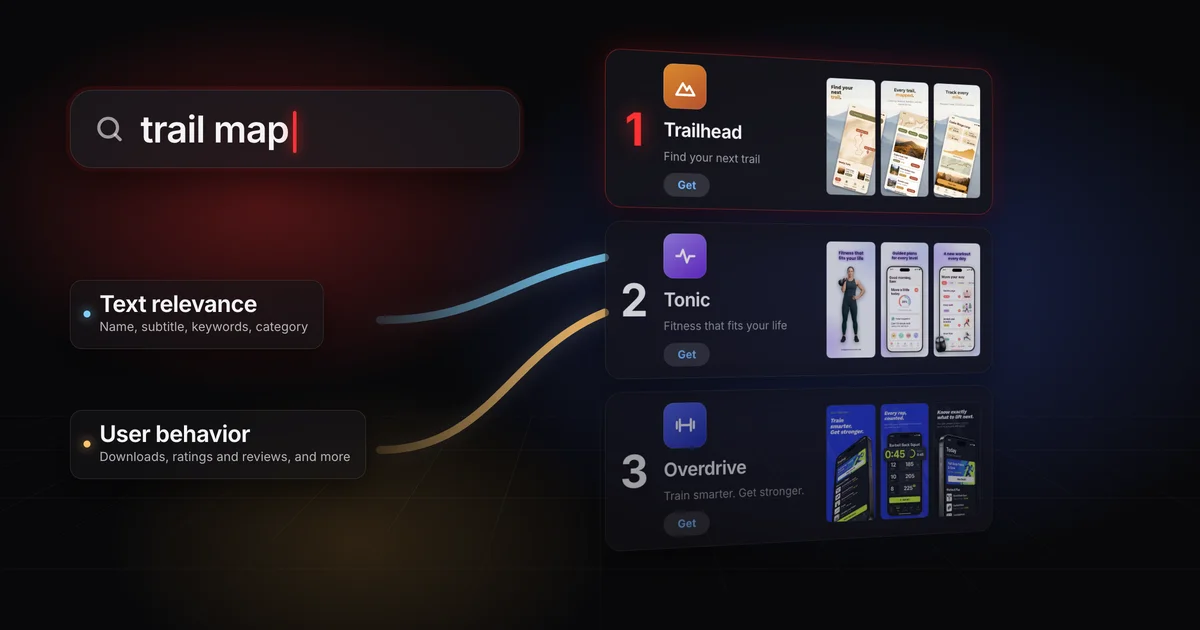
Apple says App Store search results are based on a number of factors, and doesn't publish how much each one counts.
- Text relevance: matches for your title, subtitle, keywords and primary category.
- User behavior: downloads, ratings and reviews, and more.
- Keywords make you a fit for a search; what people do when they see your app in the results also moves where you land.
On this page
App Store ranking isn't only a keyword match. Apple says search results are based on a number of factors, including text relevance (matches for your app's title, subtitle, keywords and primary category) and user behavior (downloads, ratings and reviews, and more). Your words decide how well you fit a search. What people do when they see you in those results also moves where you land.
In February 2026 Apple's machine learning team described the App Store's search ranker in a paper called Scaling Search Relevance. It names two things the ranker optimizes for:
- Behavioral relevance: "results users tend to click or download".
- Textual relevance: "a result's semantic fit to the query".
Those roughly match the two factors on Apple's App Store search page: text relevance and user behavior. Neither source publishes the weights the live ranker uses. The full paper says the ranker trains on a mix of both kinds of label and treats the mix as "a tunable hyperparameter", a dial Apple can turn. Anyone quoting exact weights is guessing.
Two kinds of relevance, and a mix Apple doesn’t publish
workout plan
Textual relevance
“a result’s semantic fit to the query”
- Name
- Subtitle
- Keywords
- Category
Behavioral relevance
“results users tend to click or download”
- Taps
- Downloads
TextualBehavioral
The mix: “a tunable hyperparameter”
Apple doesn’t publish the setting
Results
FitTaps and downloads
Search is worth getting right.
almost 65%
of App Store downloads happen directly after a search
Treat that as a 2022 advertising figure, not a current measurement.
Textual relevance asks whether your app is a sensible answer to the words someone typed. You feed it through a handful of fields.
| Field | Limit | What Apple says about it |
|---|---|---|
| App name | 30 characters | It "plays a critical role in how users discover it on the App Store" |
| Subtitle | 30 characters | Listed as a text relevance match on the search page |
| Keyword field | 100 characters | Keywords "help determine where your app displays in search results" |
| Primary and secondary category | Chosen from Apple's list | Both are "indexed by our search algorithm" |
| Promotional text | 170 characters | It "doesn't affect your app's search ranking" |
Separate terms with commas and no spaces. A space inside a multi-word phrase is fine: Apple's own example is Property,House,Real Estate. To fit more words in, Apple's product page guidance says to avoid:
- plurals of words you already have in singular form
- category names and the word "app"
- duplicate words
- special characters, unless they're part of your brand
Don't spend characters on words that already count. App Store Connect says your app is already searchable by its name and company name, and Apple's search page says not to repeat words from your app name, subtitle or category.
Some words aren't allowed at all: names of other apps or companies, and terms that aren't relevant to the app. Apple calls improper use of keywords a common reason for rejection. Screenshots have their own version of that problem, covered in why App Store screenshots get rejected.
One catch on localized listings: App Store Connect gives the keyword limit as 100 bytes, not characters. In a language whose characters take more than one byte each, the field can fill before you reach 100 characters. Apple doesn't document how it counts, so check what the field accepts. Each localization gets its own keyword field, and how to localize your App Store screenshots covers the rest of a localized listing.
According to the paper, textual relevance labels start with human judges. A judge sees a query and an app's metadata and rates how well the app fits on a graded scale (the paper's prompt template shows five levels).
Expert labels are scarce next to the clicks and downloads in Apple's search logs, so Apple fine-tuned a language model on the judges' ratings. The paper reports that this fine-tuned model beat a much larger pretrained model at matching the judges. Apple used it to label millions of query and app pairs, added those labels to the ranker's training data and tested that ranker against the one in production.
How Apple’s paper says it grades fit
- trail mapTrailhead
1Human judges
rate how well an app fits a query, on a graded scale
2A fine-tuned model
trained on the judges’ ratings
- trail mapTrailheadtrail mapTrailheadtrail mapTrailhead
3Millions of labels
query and app pairs, rated by the model
4Training data
the labels join the ranker’s training data
- ProductionvsNew labels
5A test
the new ranker against the one in production
The paper doesn't say which metadata fields the model reads, only that it gets "the same query and app metadata" the judges had. The standard it learned is what the paper calls semantic fit. My reading: that's closer to "is this app a good answer?" than to "does the word appear?", so a keyword that doesn't describe your app gives a judge, and a model trained to agree with judges, little reason to call you a good answer. Apple's developer advice points the same way: "Be specific when describing your app's features and functionality."
In a worldwide App Store A/B test published in February 2026, Apple reported that adding language-model textual relevance labels to its search ranker produced a statistically significant 0.24% increase in conversion rate, measured as the share of search sessions with at least one app download, with the biggest improvements on rare (tail) queries.[2] The paper explains why the gains landed there: rare queries don't get enough traffic to produce reliable click and download signals, so the textual labels carry more of the load.
That result has limits. It's a test of a change to Apple's ranker, and the paper doesn't say whether that version went live for everyone. It measures the ranker, not anyone's metadata, so it says nothing about what a new title or keyword list will do for your app.
Apple's keyword advice draws the same line. Popular terms "may drive a lot of traffic, but are highly competitive", especially for newer or smaller apps, while "less common terms drive lower traffic, but are less competitive." On a broad term, the apps already collecting taps and downloads have the behavioral data. On a specific search that describes exactly what your app does, a listing that fits well has room. For a fictional bouldering tracker, "fitness" is the broad term and "bouldering log" is the specific one.
A broad search and a specific one
fitness
- TonicFitness that fits your life
- OverdriveTrain smarter. Get stronger.
- More resultsYour appBouldering log for every climb
Popular terms “may drive a lot of traffic, but are highly competitive”
bouldering log
- Your appBouldering log for every climbFits the search
- TrailheadFind your next trail
Less common terms “drive lower traffic, but are less competitive”
Taps and downloads the app already collects
The paper derives behavioral relevance from "downloads and clicks from aggregated App Store search logs". In our framing, every time your app appears for a search and someone taps it or downloads it, that's a vote for you on that search. The paper doesn't say how a result that people see and skip is counted, but a skip adds no tap or download to your side.
The paper never mentions retention, App Store ratings and reviews, or screenshots. Apple's search page does add ratings and reviews, which it says "can influence how your app ranks in App Store search", and ends its list of user behavior with "and more".
Indirectly, in our reading. If taps and downloads feed ranking, then the parts of your listing people see in search results feed it too, because they're what people decide to tap on. Apple doesn't state that link. It does say your name, subtitle, rating and screenshots can appear in search results, and your icon appears there too. Its product page guidance says the first one to three images appear in search results when no app preview is available, depending on their orientation.
A preview changes what shows first, and App Store app preview specs covers whether one is worth making. Since October 2026 Apple also accepts new image and video assets for search results, covered in product page header and search result assets.
So your search result isn't decoration, and that's why I'd spend an afternoon on the first three screenshots before a third keyword rewrite. How to make App Store screenshots that convert covers what to put on them, and 3 App Store screenshot design mistakes covers what to take off.
One warning when you check your numbers: the paper's conversion rate counts search sessions that end in a download, which is not the number App Store Connect shows you. App Store conversion rate explains the ones you can see.
| Lever | Which relevance it feeds | What you control |
|---|---|---|
| App name | Textual, and people read it in results | 30 characters that say what the app does; Apple warns against generic terms |
| Subtitle | Textual, and people read it in results | 30 characters of value, in the words people search |
| Keyword field | Textual | 100 characters of specific, relevant terms with no repeats |
| Primary and secondary category | Textual | The category people would browse or filter to find you |
| Icon | Behavioral, indirectly: it shapes taps (our reading) | Recognizable at search result size |
| First one to three screenshots | Behavioral, indirectly: they shape taps (our reading) | One clear benefit per screen, in the words of the search |
| Ratings and reviews | User behavior, per Apple's search page | When you ask for a rating, and how you reply |
| Custom product pages | Apple can show them in search for keywords you select | A page built for a specific search |
| Description | Not on Apple's list of text relevance matches | Plain copy written for people |
- Pick three to five specific terms you can compete on. Choose terms that describe exactly what your app does, not the category word. Put the most important ones in the name or subtitle and the rest in the keyword field, then leave them alone long enough to see what happens.
- Make your first three screenshots answer those searches. Someone who typed a phrase should see it, or the benefit behind it, on the first screen, with one benefit per screenshot after that. Screenodon has templates to start from and real device frames for iPhone and iPad, and App Store screenshot sizes has the exact dimensions.
- Look after your rating. Ask with StoreKit's rating prompt at a moment when the app has just been useful (Apple allows the prompt up to three times in a 365-day period), and reply to reviews, good and bad. Apple says ratings and reviews influence search ranking, and your rating can show in the search result itself.
"Keywords are dead." They feed text relevance, one of the two factors Apple names, and in Apple's test the textual labels helped most on rare searches. They just aren't the whole job.
"Rewrite the keyword field every week until something sticks." That's what I did. Behavioral signals need traffic to build up, and if you change the words every week you never learn which change did what. Set them, then work on the half people see.
"Stuff keywords into the description." Apple's guidance is direct: "Don't add unnecessary keywords to your description in an attempt to improve search results."
"Add your competitors' names to the keyword field." App Store Connect doesn't allow names of other apps or companies, and Apple lists competing app names among the terms you can't use.
Apple doesn't say it is: its App Store search page lists text relevance matches for your title, subtitle, keywords and primary category, and that list (which opens with "including") leaves the description out. App Store Connect says the description will be used for web search engine results once the app is released. Apple's product page guidance says not to add unnecessary keywords to it to improve search results.
Not as a documented text input: they aren't on Apple's list of text relevance matches, and the relevance paper never mentions them. They can still matter on the behavior side, because the first one to three can appear in search results, where people decide whether to tap. How to make App Store screenshots that convert covers whether caption text counts for search.
Apple doesn't say so in the paper or on its search page. The paper defines behavioral relevance as clicks and downloads, and the search page lists downloads, ratings and reviews "and more" without naming retention.
On broad terms it's hard, because the big app already has the behavioral data. Apple says less common terms are less competitive, and its paper found the textual labels helped most on rare searches, where behavioral data is thin. That's where a specific, well-fitting listing has the best chance.
Alistair Cooper
Founder of Screenodon
I’ve spent over ten years shipping iOS apps, from a blank Xcode project to the App Store, on my own and on large teams. At Fender I was a technical lead on Fender Play and worked on apps used by millions of people.
More about me and how I write these guidesSources
- Apple Ads, Ads on the App Store
- Apple Machine Learning Research, Scaling Search Relevance (February 2026)
- Scaling Search Relevance, full paper on arXiv (2602.23234, revised June 2026)
- Apple Developer, App Store search
- Apple Developer, Creating your product page
- App Store Connect Help, Platform version information
- App Store Connect Help, Metrics definitions
- Apple Developer News, new creative assets and Asset Library (October 5, 2026)
Put this into practice on your own set
Start a free account, drop in your raw screenshots, and Screenodon lays out a first draft of the whole set for you to edit. Saving and export at every store size need Pro.
Keep reading
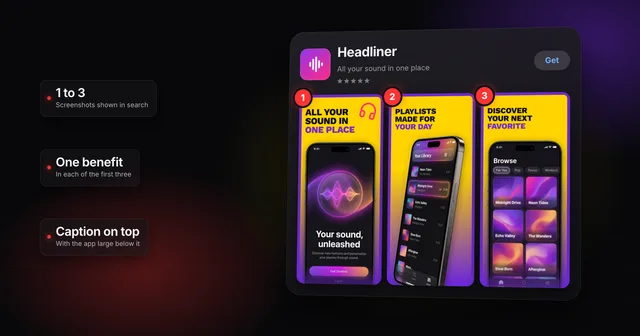 How to make App Store screenshots that actually convertHow to make App Store screenshots that convert: one benefit in each of the first three, captions for people and search, and a layout that stands out.
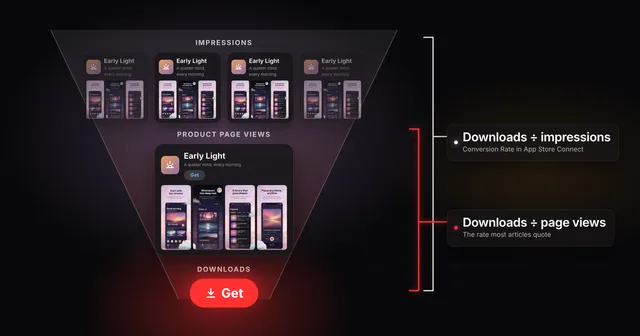 App Store conversion rate: two numbers, one nameApp Store Connect divides downloads by impressions, while most ASO articles divide by page views. Work out both rates and benchmark yours against peers.
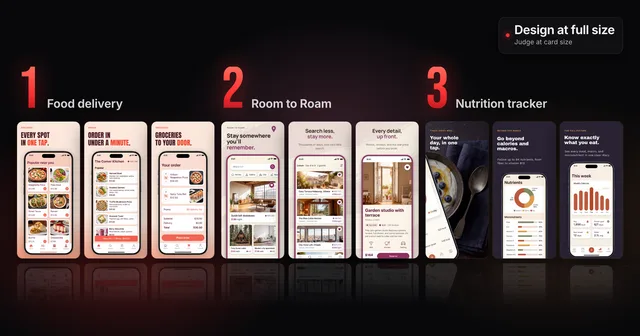 3 App Store screenshot design mistakes (and how to fix them)Three App Store screenshot design mistakes that look fine at full size and fail in search, with before and after captions and a card-size check to run.
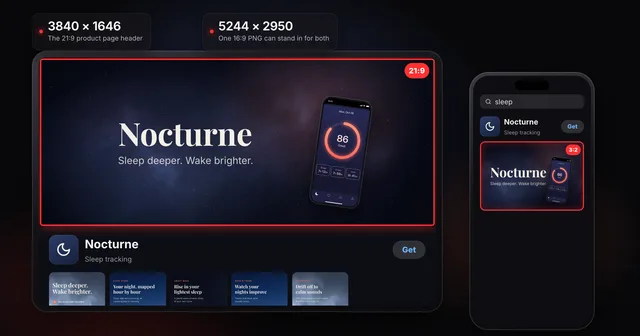 App Store product page header and search result assets: specsThe App Store product page header is 21:9 at 3840 x 1646 and the search results asset is 3:2. Universal PNG, video rules, Asset Library, guideline 2.3.14.
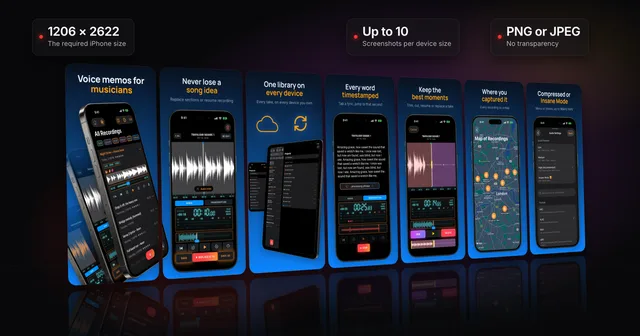 App Store screenshots: the complete guideWhere App Store screenshots appear, the sizes Apple requires now (1206 x 2622 iPhone, 13-inch iPad), the file and review rules, and how to make a set.